Skip to content

elite-build / foremanApache-2.0

An open-source AI coding app you can play with, then read.

Foreman is a free, open-source desktop app for macOS and Windows that runs AI coding agents in parallel. Claude Code, Codex, Cursor and OpenCode each work in their own git worktree on their own branch, while you review diffs, answer questions and open pull requests from one window.

  • macOS & Windows
  • Apache-2.0
  • No account
Releases since 1.0.0
31
Days since
21
Latest,
v1.2.4
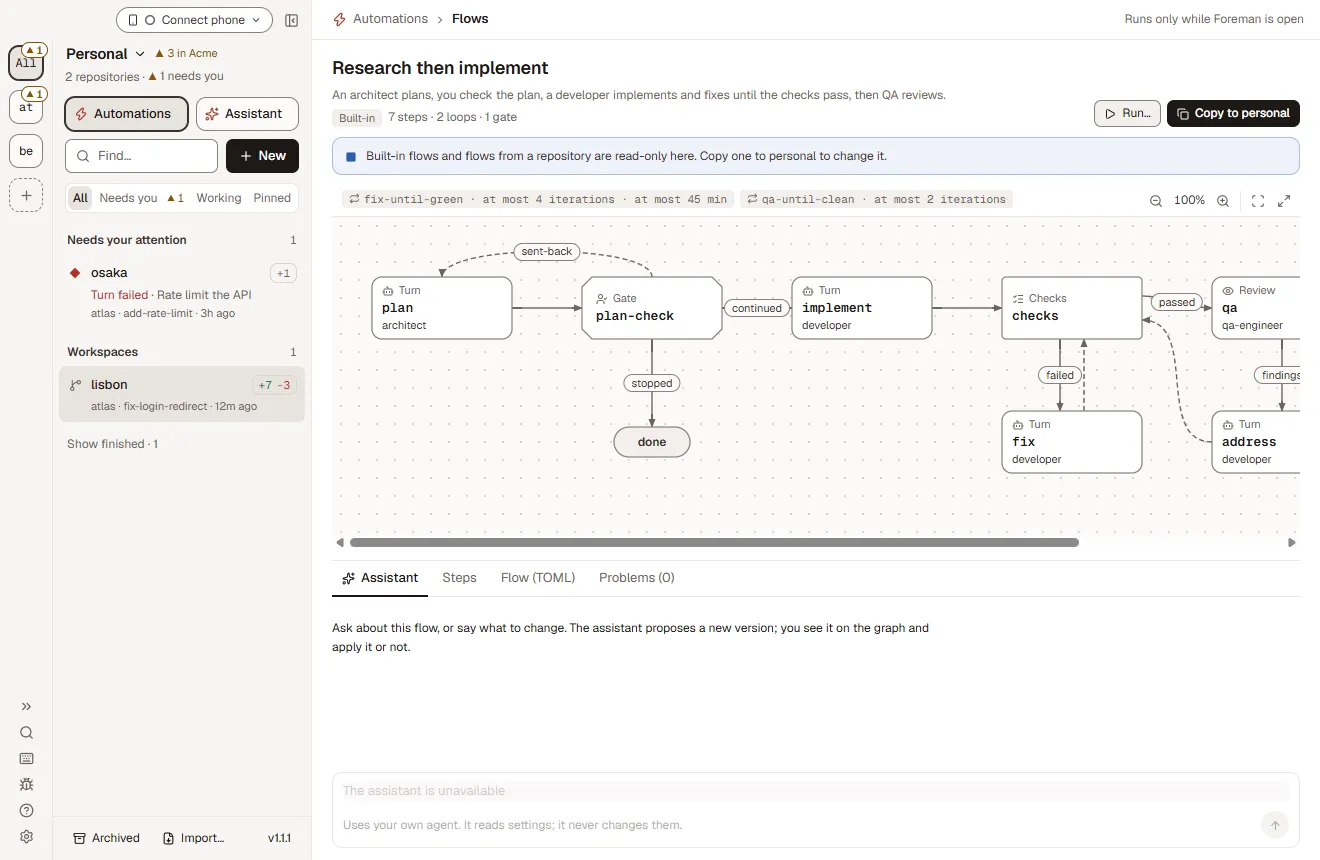
research-then-implement · 7 steps · 2 loops · 1 gate
A flow's graph of steps, loops and a gate, with the assistant under itThe drawing's stamp. Press to stamp it again.
  • I plan the change. I never touch the files.
  • I build it, then fix it until the checks pass.
  • I find problems. Fixing them isn't my job.
  • Nothing ships until I open the gate.
Fig. 1The real flow studio: a built-in flow's steps, loops and gate, with the assistant under it.

How do you read this page?

Play with a module on the left and the lines of Foreman's source it reflects light up on the right. Every excerpt is copied as is from elite-build/foreman at v1.2.4, with its path and line numbers, and links to the file on GitHub.

  1. Play with it. Each module is a working model of a feature.
  2. Read it. The real file beside it, line for line.
  3. Fork it. Every area says where a first contribution could start.

No lines lit yet. Tap something below.

01 / 07 Worktrees

Where does Foreman put each agent's worktree?

In a folder of its own, made with git worktree add on a new branch that doesn't track the base, so nothing gets pushed to main by accident. Each workspace also gets a block of ten ports, so parallel dev servers don't collide.

Play with it · Assign the crew

Tap a hat or a work order, then open a second lane.

Tap a hat or a work order. Each agent gets its own lane: a git worktree on its own branch.

Work orders
  1. 01osaka

    Open lane · waiting for a hat

    fix-login-redirectClaude Code

    +12 −3 · ready for review

  2. 02lisbon

    Open lane · waiting for a hat

    add-rate-limitCodex

    +10 −1 · ready for review

  3. 03kyoto

    Open lane · waiting for a hat

    write-testsCursor

    +48 −0 · ready for review

  4. 04lima

    Open lane · waiting for a hat

    update-docsOpenCode

    +6 −2 · ready for review

4 worktrees open · 4 signed off

Off site? Answer the crew from your phone

Agents sharing a folder: none. Each agent works in its own git worktree.

Read it · Worktrees

src/main/workspaces.tslines 850–856 · v1.2.4
      const config = [...(isWindows ? ['-c', 'core.longpaths=true'] : []), ...(noHooks ? NO_HOOKS : [])]      let args: string[]      if (!existingBranch) {        // --no-track: the branch must not push to the base branch by accident.        args = [...config, 'worktree', 'add', '--no-track', '-b', ws.branch, wsPath(ws), startPoint]      } else if (await revParse(repo.rootPath, `refs/heads/${ws.branch}`)) {        args = [...config, 'worktree', 'add', wsPath(ws), ws.branch]
src/main/ports.tslines 1–6 · v1.2.4
// Each workspace gets a block of ports so parallel dev servers don't collide.import net from 'node:net' export const PORT_BLOCK_SIZE = 10const FIRST_PORT = 50_000const LAST_PORT = 60_000

First issue? Want to change how a workspace is made? Start in src/main/workspaces.ts. Then browse good first issues and read CONTRIBUTING.

02 / 07 AI employees

How are Foreman's AI employees defined?

As data. Each of the 15 job templates is a plain object: a job, a name, a hat colour, write access and a few lines of duties, with its own prompt file beside it. Hire someone here and their entry opens.

Play with it · Build your team

Hire a role from Open roles. Flip the hold switch.

Open roles 15

Engineering

Design

Product

Data

Writing

Marketing

Customers

Hat rule A hat says who, never state. If a job's colour is taken, the new hire wears the least-worn colour instead.

Slack posts and Linear changes start held for you. Since v1.2.4 an employee pushes and opens draft pull requests on its own; this switch is the one-line rule that holds those too.

Your team 3

  • You

    The person · one of the team

    Approve each plan and each hire, and anything you've asked the team to hold.

  • Priya Lead

    Program manager

    Plans every project, proposes who it needs, reviews each part and accepts the result.

    Starts
    When you @Priya
    Access
    Writes project filesNo shellSlack · held
  • Ravi

    Staff software engineer

    Builds and fixes features, with tests, on its own branch.

    Starts
    When you askWhen assigned in Linear
    Access
    Write · atlasNo shellPush & PR · heldSlack & Linear · held

Read it · AI employees

src/shared/employeeTemplates.tslines 52–61 · v1.2.4
  {    id: 'software-engineer',    family: 'engineering',    job: 'Software engineer',    name: 'Ravi',    colour: 'blue',    access: 'write',    description: 'Builds and fixes features, with tests, on its own branch.',    responsibilities: ['Build and fix what is asked, with tests, in the repository’s conventions', 'Find the cause of a bug before fixing it', 'Keep each change small and compatible with what exists', 'Report what changed, what was not run and what is left']  },
src/shared/employeeTemplates.tslines 1–7 · v1.2.4
// Starting templates (docs/ai-employees.md §16): ready Staff employees, one per common job, that New organization offers// beside Priya and Add employee offers in an existing organization. Each has a name and hat (changed later on its// page), its job's responsibilities, its job's own prompt (shared/employeePrompts/<id>.md, which the employee is linked// to rather than given a copy of) and Write on the organization's repositories for every job, so each can push its// branch and open a pull request. Making the organization approves the ones picked, as it approves Priya; Add employee// approves the one picked. Their words are sent to agents, so they stay English like every agent prompt; the renderer// shows the job's title and line through i18n. Pure.

First issue? Want to add a sixteenth job? Start in src/shared/employeeTemplates.ts, with its prompt in src/shared/employeePrompts/. Then browse good first issues and read CONTRIBUTING.

03 / 07 Flows

What does a Foreman flow look like in code?

A TOML file: steps, edges keyed by facts such as checks passed or a clean review, and loops with bounds, like at most 4 rounds in 45 minutes. Flows are experimental and off by default.

Play with it · Draw the blueprint

Pick a built-in flow, press Run it, answer the gate.

Start from a built-in flow

⁠, ⁠, ⁠, ⁠, ⁠.

Tap any underlined part to change it.

Matches the built-in flow fix-until-green.

Ready · 4 rooms · 2 loops · 1 gate

IN · {{task}}OUT · done01implementdeveloper · edits the worktreeTURN · CLAUDE CODE02checksnpm test · tsc · lintCHECKS · NO AGENT03reviewqa-engineer · read-onlyREVIEW · CLAUDE OR CODEX04ship-checkyou · ready to ship?GATE · YOU≤ 4 roundson failed · 45 min≤ 2 roundson findingssent backJOB
IN · {{task}}OUT · done01implementdeveloperTURN · CLAUDE CODE02checksnpm test · lintCHECKS · NO AGENT03reviewqa-engineerREVIEW · CLAUDE OR CODEX04ship-checkyou decideGATE · YOU≤ 4 roundson failed≤ 2 roundson findingssent backJOB
.foreman/flows/fix-until-green.tomlSimplified for this page
# .foreman/flows/fix-until-green.toml · simplified for this page
name = "Fix until green"
description = "Skip the plan, the developer builds, the checks run until green, at most 4 rounds, the QA engineer reviews until clean, and I approve before it ships."

[inputs]
task = "What to build or fix"

[start]
step = "implement"

[steps.implement]
kind = "turn"                  # code steps run on Claude Code
persona = "developer"
loadout = 1
prompt = "{{task}}"

[steps.checks]
kind = "checks"                # the repo's approved check commands, never an agent

[steps.fix]
kind = "turn"
same_tab = "implement"
prompt = "Address what failed or what you were sent back for, and run the checks again."
context = ["checks.results"]

[steps.review]
kind = "review"                # read-only: Claude Code or Codex
persona = "qa-engineer"
                               # its default loadout 3 is Codex
context = ["diff"]

[steps.address]
kind = "turn"
same_tab = "implement"
context = ["review.findings"]

[steps.ship-check]
kind = "gate"                  # you: Continue, Send back or Stop
show = ["diff", "checks.results", "review.findings"]
ask = "Is this ready to ship?"

[edges]
implement  = "checks"
checks     = { passed = "review", failed = "fix" }
fix        = "checks"
review     = { clean = "ship-check", findings = "address" }
address    = "checks"
ship-check = { continued = "done", sent-back = "address", stopped = "done" }

[loops.fix-until-green]
over = ["checks", "fix"]
at_most = { iterations = 4, minutes = 45 }
iteration = "same-tab"         # or "compact-when-full" or "fresh-with-summary"

[loops.review-until-clean]
over = ["review", "address", "checks"]
at_most = { iterations = 2 }

[after]
workspace = "keep"             # keep | archive | delete-unchanged
Project
atlas
Flow
fix-until-green
Drawn by
the assistant
Checked by
you
Revisions
  1. A first drawn

Scale: 1 step = 1 room · persona hats drawn for this page

Site log fix-login-redirect

  1. 00:08developer: moved the redirect after setSession() · +12 −3
  2. 00:45checks: ✕ auth/redirect.test.ts › keeps returnTo after sign-in
  3. 01:22developer (fix, same tab): kept returnTo on the refresh path · +4 −1
  4. 01:59checks: ✓ 214 tests · types · lint
  5. 02:36qa-engineer: clean, no findings
  6. 03:13ship-check: waiting for you · ready to ship?

Illustrative run of the sentence above. In Foreman the Flow tab draws it live and the gate waits in Needs you. Flows are experimental: turn them on in Settings → Experimental → Flows.

Legend

  • A room is a step: a turn, checks, a review, a gate or a PR
  • A loop, with its bound and the fact that sends it round
  • Sent back from your gate, with your note
  • Your gate is a door: nothing passes until you open it
  • The job, walking from room to room on a run

Read it · Flows

src/shared/flowStarters.tslines 61–72 · v1.2.4
[edges]implement = "checks"checks = { passed = "review", failed = "fix" }fix = "checks"review = { clean = "ship-check", findings = "address" }address = "checks"ship-check = { continued = "done", sent-back = "address", stopped = "done" } [loops.fix-until-green]over = ["checks", "fix"]at_most = { iterations = 4, minutes = 45 }iteration = "same-tab"        # or "compact-when-full" or "fresh-with-summary"
docs/loops-and-graphs.mdlines 156–164 · v1.2.4
### Edges and the facts they branch on An edge is either a plain next step or a table keyed by a fact of the step it leaves. The facts are the step's own, listed above, plus the loop bounds. Nothing else: no comparisons, no text matching, no reading the agent's prose. The agent's `done` report counts as a fact because it is a deliberate call through `foreman report` or the MCP tool, not a sentence in its answer. Routing done by the file rather than by the agent is also what makes a step cheaper. An agent that has to work out the procedure as well as do the work needs a strong model and a long turn; a step that is handed one job inside a fixed procedure can often run on a smaller model in a fraction of the time. That is the practical case for per-step loadouts, and it is why `script` and `decide` exist: the more of a procedure that is deterministic, the less there is for a model to get wrong. ### Loops A loop names the steps it spans and what ends it. It ends when an edge leaves the spanned steps (the fact the loop was for came true) or when a bound is hit: `iterations`, `minutes` (time spent waiting for an agent slot doesn't count, as with schedules), `cost` (from the turns' `result` items), or the context window past a threshold with no policy to deal with it. A bound that ends a loop ends the run as `stopped`, with the bound named, never as `completed`.

First issue? Want to ship a twelfth flow? Start in src/shared/flowStarters.ts, after docs/loops-and-graphs.md. Then browse good first issues and read CONTRIBUTING.

04 / 07 Integrations

How do integrations reach coding agents without leaking keys?

Through a bridge. An agent gets a foreman-linear, foreman-slack or foreman-langfuse MCP server whose command holds no credential; Foreman answers it and forwards the calls its access allows, so the key never reaches the agent.

Play with it · Load the belt

Hang Linear, Slack or GitHub on the belt.

  1. GitHub
  2. Linear
  3. Slack
  4. Langfuse
  5. MCP
  6. Sandboxes
  7. GitLab

Connections belong to the repository, so every new workspace in atlas starts with this belt.

7 of 7 tools on the belt

Read it · Integrations

src/main/integrationBridge.tslines 1–7 · v1.2.4
// The integration bridge. Each turn of an agent that takes stdio// MCP servers gets `foreman-linear` (and `foreman-slack`, `foreman-langfuse`), whose command is Foreman's own CLI in bridge mode. The CLI// holds no credential: it shows this table's grant id over the app's owner-only socket, and the// app answers MCP requests, forwarding allowed tool calls to Linear's hosted MCP with the real// key. So the key never reaches an agent, an MCP server process or argv; the grant id does// (agents put MCP config on their command line), which is why it's scoped, checked on every call// against the repository's connection as it is now, and dropped when the session closes.
src/shared/autoFix.tslines 1–9 · v1.2.4
// #5 Auto-fix CI: the rules, pure, so they can be tested without a clock, gh or// an agent. When CI fails on the watched PR, Foreman may send the failing logs to// the tab the user approved, once per failure (PR + head SHA + failing checks),// within a budget, only while the workspace is idle and no other auto-fix runs.// It stops instead of looping, and never says CI recovered: only the checks do.import type { AutoFix, AutoFixAttempt, AutoFixStop, CiWatch, TurnOutcome } from './types' /** The mock's defaults: 2 per head commit, 5 per PR, 20 minutes per fix turn. */export const AUTO_FIX_BUDGET = { perHead: 2, perPr: 5, maxMinutes: 20 } as const

First issue? Want to add an integration? Start in src/main/integrationBridge.ts. Then browse good first issues and read CONTRIBUTING.

05 / 07 Sandboxes

Which cloud sandboxes can a Foreman workspace run in?

E2B, Daytona, Vercel Sandbox and Docker, each one entry in a table of capabilities and plan limits. It's experimental and off by default, and a provider's key is read on your computer and never goes into the sandbox.

Play with it · Send it off-site

Pick a container, Create, then close the laptop.

New workspace · atlas

Workspace

Runs on

Sandbox
E2B
Size
vCPU
Starts from
A fresh clone, set up when it’s made
Sleeps after
20 min idle
Agent sign-in
Claude setup token

Your Claude subscription sign-in stays on this computer. In a sandbox Claude uses a setup token from claude setup-token, or an API key.

On E2B a session ends after 60 minutes. Foreman continues the turn when you’re around; with Foreman closed, the agent stops at the limit and the workspace sleeps.

Remote workspaces run on E2B. Experimental.

This computer

Foreman · atlasZzz

Vault

  • Provider keystays here
  • GitHub tokenstays here
  • Agent sign-instays here
Property line · provider keys stop here
  1. Clone from GitHub The repository comes from its GitHub remote. GitHub’s token goes in as that one command’s environment.
  2. Install the agent host Foreman puts its small agent host in the sandbox, so the agent can run there without your computer.
  3. Set up The install script and the repository’s setup steps run, as they would in a local worktree.
  4. Run The agent takes the turn in the sandbox. Your computer only coordinates.

Session · not started

Turn · waiting to ship

  1. Pick a workspace and a container, then Create. Closing the laptop quits Foreman: remote turns go on in their sandboxes until they finish or reach the session limit, and their chats catch up when you open Foreman again.

This month · no sandbox time yet

Read it · Sandboxes

src/shared/cloud.tslines 146–159 · v1.2.4
  e2b: {    id: 'e2b',    label: 'E2B',    kind: 'hosted',    implemented: true,    connection: { kind: 'token', fields: [{ key: 'token', secret: true, placeholder: 'e2b_…' }, { key: 'domain', optional: true, placeholder: 'e2b.app' }] },    // Pause keeps a sandbox's files and memory on every plan; a size is a template (e2bTemplate.ts), one per option.    capabilities: { fork: false, base: false, snapshotOnStop: true, sessionCap: true, pty: true, regions: [], vcpuOptions: [2, 4, 8], billed: true },    // Hobby's (docs.e2b.dev/billing): an API key can't read the team's plan, so verify records these.    limits: { maxSessionMs: HOUR, maxVcpus: 8, maxConcurrent: 20 },    defaultRegion: '',    defaultVcpus: 2,    docsUrl: 'https://docs.e2b.dev'  },
src/main/cloud/sandboxes.tslines 1–7 · v1.2.4
// SandboxManager: the life of remote workspaces'// sandboxes on any provider. A base sandbox per repository (clone, install script, saved) when the// provider keeps bases, a sandbox per workspace started from it (or cloned and set up from scratch// when it doesn't), wake and sleep, the session budget, plan limits, orphans and idle sleep. It branches// on the provider's capabilities, never on its id. Foreman's main process coordinates sandbox work; a// provider's key is read from the vault here and nowhere else, and never goes into a sandbox. GitHub's// token reaches a sandbox only as one command's environment.

First issue? Want to add a sandbox provider? Start in src/shared/cloud.ts, then src/main/cloud/. Then browse good first issues and read CONTRIBUTING.

06 / 07 Automations

Where do Foreman's templates and schedules come from?

The seven built-in templates are a plain list, with {{placeholders}} for what you fill in. Schedules follow a few constants: a run more than 5 minutes late is skipped, and at most two scheduled runs go at once.

Play with it · Pin a template, file the slip

Pick a template, then File the slip.

The seven templates that ship 7

Saved prompts yours · blanks written out

Blanks fill in order: foreman run fix-a-bug "the login page loops". A scheduled run can't stop to ask, so only templates without {{blanks}} go on a schedule. Repository templates live in.foreman/templates and travel with the code.

Schedule slipNo. 0042

nightly-triage on atlas

Every
in Europe/London
Runs on
Claude Code, a Sonnet by default
Max
30 minutes5 to 480
After
Approved
its text, the repo's setup, checks and MCP servers

Runs every day at 00:30 (Europe/London) · stops after 30 minutes · keeps the workspace

foreman schedules add nightly-triage --repo atlas --every daily --at 00:30 --tz Europe/London

Read it · Automations

src/shared/promptTemplates.tslines 23–33 · v1.2.4
export const DEFAULT_PROMPT_TEMPLATES: PromptTemplate[] = [  {    id: 'default-explain',    name: 'Explain code',    body: 'Explain how {{file or feature}} works: the main pieces, how data flows through them, and anything surprising. Don’t change any code.'  },  {    id: 'default-fix-bug',    name: 'Fix a bug',    body: 'Fix this bug: {{what happens and what should happen}}\n\nFind the root cause first, add a test that fails without the fix, then fix it and run the relevant tests.'  },
src/shared/schedule.tslines 8–13 · v1.2.4
export const MAX_DURATION_CHOICES = [15, 30, 60, 120, 240] as constexport const DEFAULT_MAX_MINUTES = 30/** A run later than this after its planned time is "missed" and skipped, never replayed. */export const MISSED_GRACE_MS = 5 * 60_000/** At most this many scheduled runs at once across all schedules. */export const GLOBAL_ACTIVE_CAP = 2

First issue? Want to ship an eighth template? Start in src/shared/promptTemplates.ts. Then browse good first issues and read CONTRIBUTING.

07 / 07 Personas

What decides who does which part of a job?

You do, with files you can read. A persona is Markdown with its rules up front: what a step is shown, whether it is read-only, how it must end. Deal a job and the file behind that crew opens.

Play with it · Deal a loadout

Pick a job, then Deal a loadout.

The job

Loadout for fix flaky tests

  1. DeveloperClaude CodeAgent · Anthropic

    Writes the fix. Flow steps that change code run on Claude Code, the one agent Foreman runs unattended.

  2. ReviewerCodexAgent · OpenAI

    Reads the diff read-only, inside its own sandbox. A flow’s review steps can run on Codex.

  3. Review personaqa-engineerFlow persona · reviewer

    What the reviewer wears: it finds what breaks, never fixes it, and ends with findings.

  4. At the gateYouThe foreman · one of one

    Quarantine the test, keep the fix, or send it back with a note. Nothing ships before you look.

Plays as the built-in flow flaky-test-triage. Flows are experimental and off by default: Settings → Experimental.

Run them side by side in Foreman, each in its own worktree.

Read it · Personas

src/shared/flowStarters.tslines 531–545 · v1.2.4
[start]step = "workspace" [steps.workspace]kind = "workspace" [steps.run-tests]kind = "script"command = "flaky-tests" [steps.triage]kind = "decide"persona = "developer"loadout = 1options = ["flaky", "real", "clean"]

First issue? Want to add a persona? Start in src/shared/personaStarters.ts. Then browse good first issues and read CONTRIBUTING.

What else is worth reading?

The phone's access levels and the command line's exit codes: two short files that say exactly what each promises.

What can a paired phone do?

What you approved at pairing: Watch, Operate or Full control, each a set of scopes. On the same Wi‑Fi it connects directly, and from anywhere else over your own Tailscale network, with no Foreman relay.

Native iOS and Android apps are coming soon.

Today: pair your phone with a QR code and add the phone view to your Home Screen.

Read it · Phone

src/shared/mobile.tslines 3–13 · v1.2.4
/** What a phone or browser was approved to do (docs/server.md, "Sessions"): Watch, Operate or Full control. */export type MobileAccess = 'read' | 'operate' | 'admin' export const MOBILE_ACCESS = ['read', 'operate', 'admin'] as const satisfies readonly MobileAccess[] /** The scopes each access gives. Never `window`: that stays with the computer's own screen. */export const ACCESS_SCOPES: Record<MobileAccess, readonly Scope[]> = {  read: ['read'],  operate: ['read', 'operate'],  admin: ['read', 'operate', 'admin']}

Can I script Foreman?

Yes. Almost everything in the window works from the foreman command, every command takes--json, and exit codes are the same for every command, from 0 for done to 8 for not found.

foreman flow run fix-until-green --input task="make the tests pass" --wait

Read it · CLI

docs/cli.mdlines 35–45 · v1.2.4
Exit codes, the same for every command:   0  Done (wait: the turn completed; checks: they passed)  1  Failed; or the turn failed, was stopped or was interrupted; or a check failed  2  Usage error (unknown command or option, a bad value); or wait timed out; or checks errored  3  Setup held (run); or checks are not configured  4  Busy (checks while an agent turn is active)  5  Foreman isn't running, or the connection to it dropped  6  Needs confirmation or consent (--yes is missing, or what you were shown has changed)  7  Refused by policy (a turn token on a command that changes setup, or agents may not start work)  8  Not found or ambiguous (workspace, repository, tab, template…)

Contributors

How do I build Foreman from source?

With Node.js 22.12+ or 24 and Git: npm install, then npm run dev demo opens the app on demo data, with no network and no agent login. npm test runs the tests.

  • The demo has two repositories, three workspaces with chats and diffs, and a flow run that stops at its gate.
  • Before a pull request, run npm run typecheck, npm test and npm run build. There's no CI yet, so you run the checks yourself.
  • Use a fork and a focused pull request, ending with a one-line release note.

~/code/foreman

  1. npm install

    # Node.js 22.12+ (22.x) or 24.x, and Git

  2. npm run dev demo

    # Demo data: no network, no agent login

  3. npm test

    # The tests. Typecheck and build are the other checks

Side by side

How does Foreman compare with Conductor and T3 Code?

Foreman is open source under Apache-2.0 and runs on Windows as well as macOS, while Conductor is a closed-source Mac app. Next to T3 Code, it adds flows, AI employees with git-backed memory and a CLI where every command takes--json.

A dash means not listed on their site

Foreman compared with Conductor and T3 Code
FeatureForemanConductorT3 Code
Open sourceApache-2.0NoMIT
macOSYesYesYes
WindowsYesMac onlyYes
One git worktree per agentYesYesYes
AgentsClaude Code, Codex, Cursor, OpenCode, any ACP agentClaude Code, Codex, CursorClaude Code, Codex and more
Flows that loop until checks pass, with human gatesYes——
AI employees with git-backed memoryYes——
Scheduled automations and auto-fix CIYes——
Your own cloud sandboxes (E2B, Daytona, Vercel, Docker)Experimental——
Scriptable CLI, --json on every commandYes——
Approve from your phoneYes—Yes
No account, no telemetry uploadYes——
From each project's own site as of November 2026. “—” means it isn't listed there, not that it's missing. Spot a mistake? Tell us.

Or just use it

Get started in a minute

Download the app, point it at a git repository, and give each task its own workspace.

  1. Download Foreman

    Free for macOS (Apple Silicon, signed and notarized) and Windows. You need Git on your PATH.

  2. Add a repo, sign in an agent

    Pick any git repository. Sign in Claude Code, Codex, Cursor or OpenCode in Settings → Agents with your own login or key.

  3. Create workspaces

    One per task, each a fresh worktree on its own branch. Watch them in Tiles, review the diffs, open the PR.

Prefer a terminal? Same thing, one line.
foreman run fix-a-bug "the login page loops after sign-in" --repo atlas --wait

# Start a workspace from a template and wait for the turn. CLI reference

Questions

Questions developers ask

Something missing? Open an issue or read the guide.

What is Foreman?

Foreman is a free, open-source desktop app for macOS and Windows that runs AI coding agents in parallel. Claude Code, Codex, Cursor and OpenCode each work in their own git worktree on their own branch, while you review diffs, answer questions and open pull requests from one window.

Is Foreman free and open source?

Yes. Foreman is free and licensed under Apache-2.0, with the full source on GitHub at github.com/elite-build/foreman. There is no paid tier, no account and no Foreman cloud service.

Which coding agents does Foreman support?

Foreman runs Claude Code, Codex, Cursor and OpenCode, plus any agent that speaks the Agent Client Protocol (ACP). Each agent signs in with your own subscription or API key, set in Settings → Agents.

How do I run multiple Claude Code agents in parallel?

Add a git repository to Foreman and create one workspace per task. Each workspace is a separate git worktree on its own branch, so several Claude Code sessions edit the same repository at once without conflicts. Tiles shows them side by side.

Why does each agent need its own git worktree?

A git worktree is a second checkout of the same repository on a different branch. Giving each agent its own worktree means agents never overwrite each other's files, every change lands on a reviewable branch, and your main checkout stays untouched.

Does my code leave my computer?

Only through the agents you choose. Foreman runs locally with no account and no telemetry upload; your agents talk to their own model providers. In your own workspaces, an approval marks any command that leaves your computer before it runs, and AI employees hold Slack posts and Linear changes for you.

Do coding agents need my approval for every command?

Only if you want them to. Approvals are a setting: with Claude Code tool approvals on (Settings → Account), each command is spelled out part by part before it runs, anything that leaves your computer is marked, and Always allow shows exactly what it adds. Every agent still works in its own worktree, and checkpoints rewind any turn.

Which operating systems does Foreman run on?

Foreman runs on macOS (Apple Silicon, signed and notarized) and Windows. You need Git on your PATH and a login or API key for at least one agent.

Can Foreman run coding agents on a schedule?

Yes. Any saved prompt template can run hourly, daily, weekly or monthly in your time zone, and opt-in auto-fix sends failing CI logs to your agent. Scheduled runs use Claude Code and happen while Foreman is running, which can be without a window or from login.

Can I control Foreman from my phone?

Yes. Pair a phone with a QR code to answer approvals, steer agents, comment on diffs and read terminals, live. On the same Wi-Fi it connects directly, and anywhere else through your own Tailscale network. Native iOS and Android apps are coming soon.

Can coding agents run in a cloud sandbox like E2B?

Yes, as an experiment. A workspace's worktree and agent can run in a sandbox on your own E2B, Daytona, Vercel Sandbox or Docker account, for Claude Code, Codex and OpenCode. Provider keys stay on your computer and never go into the sandbox.

Which integrations does Foreman have?

GitHub (pull requests, merges, CI and reviews), GitLab, Linear, Slack and Langfuse, plus MCP. Each connection has a default per service, each repository can pick its own, and you choose what agents may do with it: nothing, read, or read and write.

How is Foreman different from Conductor?

Foreman is open source under Apache-2.0 and runs on Windows as well as macOS, while Conductor is a closed-source Mac app. Foreman also drives OpenCode and any ACP agent, and adds flows that loop until checks pass, AI employees and a scriptable command line.

How is Foreman different from T3 Code?

Both are open-source GUIs for coding agents. Foreman adds flows (agent graphs that loop until tests pass, with human gates), AI employees with a git-backed memory, a foreman CLI where every command takes --json, phone approvals and remote sandboxes.

Can I script Foreman or use it in CI?

Yes. The foreman command starts workspaces, sends messages, answers approvals, opens and merges pull requests and runs flows. Every command takes --json and exit codes are the same for every command.
git clone https://github.com/elite-build/foreman

You've read the source. Now make it yours.

31 releases since 1.0.0 on 27 Oct, all in the open under Apache-2.0. Star it to follow along, fork it to change it, and pick up a first issue to join the crew.